
How to Detect and Prevent the iPhone Password Phishing Scam
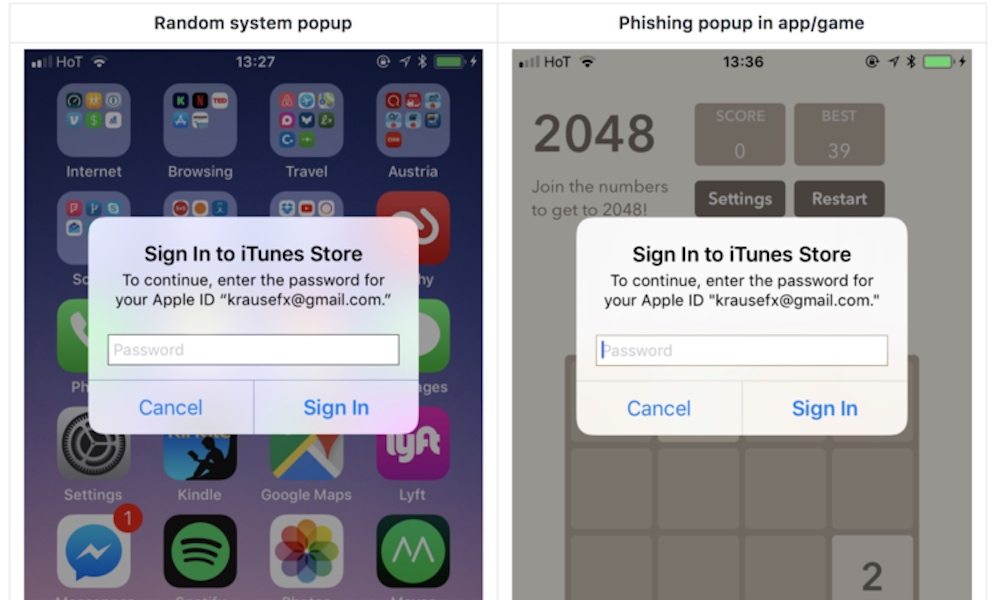
Apple’s iOS is vulnerable to a new phishing attack, which is even more troubling because it’s extremely difficult to detect.
The malicious iOS app pushes a pop-up requesting your iCloud password that looks identical to a legitimate pop-up, leaving iOS users vulnerable to having their Apple ID passwords stolen and giving access to their iCloud accounts to hackers.
Felix Krause, founder of Fastlane, explains in his blog post that this iOS securityloophole is very easy to abuse has been present for years. Krause declined to publish the actual source code of the pop-up, but noted that it is “shockingly easy to replicate the system dialog”.
It’s very simple to exploit the flaw due to the fact that users are used to being asked for their passwords very often, including when they are making app purchases, buying games, or accessing iCloud data.
The phishing scam doesn’t even require hackers to know your email address, Krause notes, because Apple sometimes sends password requests to users withoutmentioning their email addresses.
“iOS asks the user for their iTunes password for many reasons, the most common ones are recently installed iOS operating system updates or iOS apps that are stuck during installation. As a result, users are trained to just enter their Apple ID password whenever iOS prompts you to do so,” Krause said.
“However, those popups are not only shown on the lock screen, and the home screen, but also inside random apps, e.g. when they want to access iCloud, Game Center or In-App-Purchases.”
How to Detect and Prevent Apple ID Password Phishing
Thankfully, there’s a simple way to make sure that you are entering your password into an official dialog box instead of a phony one.
- Krause explains that all you have to do is hit the home button any time a pop-up box appears.
- If hitting the home button closes the app, then it was a phishing attack. If it remains on your screen, it’s a legitimate one.
- To be safe, users should perform this test before entering any characters of their password into pop-ups.
Categories: Articole de interes general
 De ce a spus Isus: „Am dorit mult să mănânc Paștele acesta cu voi înainte de patima Mea“
  Barzilaiendan
Leave a comment